

SQ Hive
Scroll down for code samples, example requests and responses. Select a language for code samples from the tabs above or the mobile navigation menu.
Introduction
SQ hive allows developers to access ScoutQuest’s AI powered high quality, actionable and de-noised capital market insights at lightning fast speeds.
Characteristics
Updates provided by us has the following characteristics:
| Simple | The language of our updates is simple as we strip out most of the jargon |
| Relevant | Through our proprietry algorithms, We filter out most of the non-relevant news. |
| Actionable | Updates provided by us are actionable |
| Structured | Based on the type of updates you can choose to define your handling. |
| High Coverage | Updates are sent for all mainboard BSE listed entities. |
| Comprehensive | Our bots listen to thousands of sources including Exchange websites, Conference Calls, Twitter, News Channels, Youtube and many more, providing a 360 degree update coverage. |
| Realtime | All of the above is done and dissimenated to you at lighning speed. |
You can view this short video to know more.
How to recieve updates?
We provide 2 methods to recieve these updates.
- Webhooks
- API
You can register an endpoint where you will recieve each update as and when it happens. Alternatively you can periodically poll for new updates via the API endpoint.
How to use these updates?
Examples of general use cases include - Sending these updates to your clients based on their holdings, Having a general/personalised news feed on your website/app etc.
Use case is upto you, however it is mandatory to attribute ScoutQuest
What should be format for attribution?
- Each Update should have a
Powered by ScoutQuest.intext at the bottom of the message, whereScoutQuest.inshould be clickable - For Each update the CTA / More Details Link should be the shortLink provided in the update message.
API
Base URLs:
Staging: http://scoutquest-backend-service-staging.fundsmap.com
Live: http://scoutquest-backend-service-production.fundsmap.com
Authentication
SQ Hive uses API keys to allow access to the API. SQ Hive expects for the API key to be included in all API requests to the server in a header that looks like the following:
x-api-key: yourapikeyhere
Get Instrument Update Messages
require "uri"
require "net/http"

url = URI("http://scoutquest-backend-service-staging.fundsmap.com/hive/api/v1/instrumentUpdates/query?pageNo=0&pageSize=200&sortDirection=DESC")

http = Net::HTTP.new(url.host, url.port);
request = Net::HTTP::Get.new(url)
request["x-api-key"] = "yourapikeyhere"

response = http.request(request)
puts response.read_body
import requests

defaultQuery = "http://scoutquest-backend-service-staging.fundsmap.com/hive/api/v1/instrumentUpdates/query?pageNo=0&pageSize=200&sortDirection=DESC"

timeRangeQuery = "http://scoutquest-backend-service-staging.fundsmap.com/hive/api/v1/instrumentUpdates/query?fromTime=1718709015&toTime=1718190615"

messageIdQuery = "http://scoutquest-backend-service-staging.fundsmap.com/hive/api/v1/instrumentUpdates/query?messageId=590860706281420591&expression=GT"

payload = {}
headers = {
  'x-api-key': 'yourapikeyhere'
}

response = requests.request("GET", url, headers=headers, data=payload)

print(response.text)
curl --location 'http://scoutquest-backend-service-staging.fundsmap.com/hive/api/v1/instrumentUpdates/query?pageNo=0&pageSize=200&sortDirection=DESC' \
--header 'x-api-key: yourapikeyhere'

curl --location 'http://scoutquest-backend-service-staging.fundsmap.com/hive/api/v1/instrumentUpdates/query?fromTime=1718709015&toTime=1718190615' \
--header 'x-api-key: yourapikeyhere'

curl --location 'http://scoutquest-backend-service-staging.fundsmap.com/hive/api/v1/instrumentUpdates/query?messageId=590860706281420591&expression=GT' \
--header 'x-api-key: yourapikeyhere'
const axios = require('axios');

let config = {
  method: 'get',
  maxBodyLength: Infinity,
  url: 'http://scoutquest-backend-service-staging.fundsmap.com/hive/api/v1/instrumentUpdates/query?pageNo=0&pageSize=200&sortDirection=DESC',
  headers: {
    'x-api-key': 'yourapikeyhere'
  }
};

axios.request(config)
.then((response) => {
  console.log(JSON.stringify(response.data));
})
.catch((error) => {
  console.log(error);
});
OkHttpClient client = new OkHttpClient().newBuilder()
  .build();
MediaType mediaType = MediaType.parse("text/plain");
RequestBody body = RequestBody.create(mediaType, "");
Request request = new Request.Builder()
  .url("http://scoutquest-backend-service-staging.fundsmap.com/hive/api/v1/instrumentUpdates/query?pageNo=0&pageSize=200&sortDirection=DESC")
  .method("GET", body)
  .addHeader("x-api-key", "yourapikeyhere")
  .build();
Response response = client.newCall(request).execute();
The above command returns JSON structured like this:
{
"instrumentUpdateMessages": [
{
"id": "589113564166804304",
"title": "Amber Enterprises India Ltd",
"description": "Restructuring",
"content": "Intimation on pronouncement of the order dated 11 June 2024 (uploaded on website of Hon''ble NCLT on 13 June 2024) under first motion application bearing Company Application No. (CAA)67(MB)2024 ....",
"scripDetails": {
"bseScripCode": "540902",
"scripName": "Amber Enterprises India Ltd",
"bseTickr": "AMBER",
"nseTickr": null,
"isin": "INE371P01015"
},
"linkDetail": {
"shortLink": "https://sqst.in/4PRQX"
},
"creationTime": 1718292418,
},
{
"id": "589113559821504865",
"title": "Amber Enterprises India Ltd",
"description": "Restructuring",
"content": "Intimation on pronouncement of the order dated 11 June 2024 (uploaded on website of Hon''ble NCLT on 13 June 2024) under first motion application bearing Company Application No. (CAA)67(MB)2024 ....",
"scripDetails": {
"bseScripCode": "540902",
"scripName": "Amber Enterprises India Ltd",
"bseTickr": "AMBER",
"nseTickr": null,
"isin": "INE371P01015"
},
"linkDetail": {
"shortLink": "https://sqst.in/SIKoq"
},
"creationTime": 1718292417,
"filterCategory": "UNCLASSIFIED"
},
{
"id": "589113551676169507",
"title": "Paytm",
"description": "Trending News - Business news: Paytm to focus on distribution of insurance products of other insurers | Biz highlights",
"content": "Business Wrap: Here are the top developments of the day, Shares of Exide Industries Limited hit a record high on June 13 following company's Rs 75 crore investment in EESL. Soon after taking over as the aviation minister, Ram Mohan Naidu announced his commitment to ensuring more affordable airfares for domestic flights. Watch for more!",
"scripDetails": {
"bseScripCode": "543396",
"scripName": "Paytm",
"bseTickr": "PAYTM",
"nseTickr": null,
"isin": "INE982J01020"
},
"linkDetail": {
"shortLink": "https://sqst.in/e31EG"
},
"creationTime": 1718292415,
"filterCategory": "MEDIA_COVERAGE"
}
],
"total-items": 9984,
"current-page": 0,
"total-pages": 3328
}
This endpoint retrieves all instrument updates fittng your query description. Results are returned in paginated formate.
HTTP Request
GET http://scoutquest-backend-service-staging.fundsmap.com/hive/api/v1/instrumentUpdates/query
Possible Queries
- Get updates for a given time period (using
fromTimeandtoTime) - Get data for a specific update (
messageId) - Get updates before/after a specific update (
messageId+expression) - Get updates for a specific scrip (
scripIdType+scripId)
Query Parameters
| Parameter | Default | Description |
|---|---|---|
| pageNo | 0 | change pageNo for next set of results fitting your query description |
| pageSize | 200 | No of results to be returned in a single page. You can fetch more results by calling for the next pageNo. Maximum value of pageSize is 1000 |
| sortDirection | DESC | Direction for the sorting of messages wth respect to the time when the message was created. DESC will return the results with the latest update messages at the top. Possible values (ASC, DESC) |
| fromTime | - | Used when you need updates within a time range. if toTime query is absent, toTime is assumed to be the currentTime |
| toTime | - | Used when you need updates within a time range. fromTime query must also be present if toTime is mentioned |
| messageId | - | Used to fetch messages equal to, or chronologically before/after a messageId. Useful when you have processed messages uptil a certain message and now need to process messages after it or you need to lookup a specific update based on messagesId. expression query parameter is control this behaviour. If expression value is not passed, By default only data for a given messageId will be passed i.e. expression will be considered to be EQ. |
| expression | - | Used in conjuction with messageId. Controls the behviour of wether you want to get messages created after a given messageId or before. Possible values: (GT,GOE,LT,LOE,EQ); GT = Greater Than, GOE = Greater Than or Equal to, LT = Lesser Than, LOE = Lesser Than or Equal to, EQ = Equal To. If value of expression is passed without messageId , it will be ignored. |
| scripIdType | - | Useful when you want to query updates for a particular scrip. This property will signify which type of ID will you be using to pass the scrip identifier. Possible values: BSE_SCRIP_CODE,BSE_TICKR |
| scripId | - | Useful when you want to query updates for a particular scrip. This is where you will pass the actual ID of the scrip. If you pass BSE_SCRIP_CODE as the scripIdType, you need to pass the BSE Scrip code, in case of Tata Motors Ltd. BSE_SCRIP_CODE is 500570 and BSE_TICKR is TATAMOTORS. You can refer to Instrument Masters like Bhavcopy or Scrip master(SCRIP.zip) from this BSE site |
| curationType | CURATED | Used to supress updates which are deemed less important by ScoutQuest. Possible values CURATED, NON_CURATED. Default value is CURATED. Updates are classified as CURATED based on our internal logic. Most consumer facing applications will find these updates as most relevant for presentation to end user. NON_CURATED updates includes CURATED updates + other updates. |
Response Object
The update will have 4 main components - title, description, content, linkDetail.shortLink which can be used. title + description will give you information about the company and the type of update that is being sent. content will give you details about the update.
- Instrument Update Message Related Fields
| Field | Description |
|---|---|
| id | ID of the instrument update message |
| title | Gives the long name of the company. Can contain emojis characters. |
| description | Gives the type of the update. Can contain emojis characters. |
| content | This field has the details about the update. Can contain emojis characters. |
| scripDetails.bseScripCode | Gives BSE scrip code of the company if present, else null |
| scripDetails.scripName | Gives the long scrip name |
| scripDetails.bseTickr | Gives BSE Tickr of the company if present, else null |
| scripDetails.nseTickr | Gives NSE Tickr of the company if present, else null |
| scripDetails.isin | Gives ISIN the company |
| linkDetail.shortLink | Gives the link where user can know more about the update. This link needs to be present for any update that you disseminate / publish |
| creationTime | Creation time of the update in epoch format (Epoch time is always in UTC time zone, Please add +5:30 hours to get the time in IST time zone) |
| filterCategory | This field can be used to filter out certain kinds of update. Possible Values: KEY_UPDATE, UNCLASSIFIED, ANALYTICAL_UPDATE, EVENT_SCHEDULE, TECHNICAL_IDEA, MEDIA_COVERAGE, SPVMA. Read More in the Examples section. |
| smartTags Hive Pro | A three-word tag that classifies each update into predefined, actionable categories. |
| concernFlags Hive Pro | Indicators such as Red Flag or Review for Concern to highlight updates requiring investor attention. |
| flagNote Hive Pro | A concise, one-line explanation for the flag. |
| deepDive Hive Pro | A one-page HTML article providing a detailed explanation of the update for investors. |
| additionalDetails Hive Pro | Provides a JSON data on the specifics of the update. Examples include revenue/PAT in results or shareholding details in large transactions. |
- Pagination Related fields
| Field | Description |
|---|---|
| currentPage | Current Page No, starts with 0 |
| totalItems | Total items(instrumentUpdateMessages) available for the given query |
| totalPages | Total pages for the available result |
Postman
View these calls in postman
Webhooks
Introduction to SQ Hive Webhooks
Webhooks are how services notify each other of events. At their core they are just a POST request to a pre-determined endpoint. The endpoint can be whatever you want, and you can just add them from the UI. You normally use one endpoint per service, and that endpoint listens to all of the event types. For example, if you receive webhooks from Acme Inc., you can structure your URL like: https://www.example.com/acme/webhooks/.
The way to indicate that a webhook has been processed is by returning a 2xx (status code 200-299) response to the webhook message within a reasonable time-frame (15s). It's also important to disable CSRF protection for this endpoint if the framework you use enables them by default.
Another important aspect of handling webhooks is to verify the signature and timestamp when processing them. You can learn more about it in the webhook signature verification.
Instrument Update Created Message - Webhook Events
We have a variety of event types that you can subscribe to. For example, one such event is v1.instrument_update.created. Here is a sample payload for v1.instrument_update.created. This is identical to the Instrument Update Message that you can fetch via the API:
Here is a sample payload for
v1.instrument_update.created:
{
  "creationTimestamp": 1717247896,
  "eventId": "evt_cdab7cfe-043c-4d4a-99c1-258c0a60f4b8",
  "eventType": "V1_INSTRUMENT_UPDATE_CREATED",
  "payload": {
    "content": "- Record pre-sales: Q4 FY24 at INR 42.3 billion (40% YoY growth) and FY24 at INR 145.2 billion (20% YoY growth). - Strong EBITDA margin: ~30% for FY24 and ~31% for Q4 FY24. - Robust operating cash flow: INR 57.2 billion for FY24 and INR 20.5 billion in Q4 FY24. - Reduced debt: Net debt at INR 30.1 billion, 0.34x debt-to-equity ratio before March 2024 capital raise. - Improved credit rating: Rated AA- (Stable) by ICRA. - Lower cost of funds: Average cost decreased by 10 basis points to ~9.4%. - Increased dividend: Dividend payout increased by 125% to INR 2.25 per share for FY24. - New project additions: Exceeded full-year guidance by adding INR 203 billion of GDV in new projects during FY24. - Geographic expansion: Successfully launched two projects in Bangalore, achieving INR 12 billion in sales within two quarters. - Pune market growth: Pune pre-sales reached nearly",
    "creationTime": 1717247895,
    "description": "Macrotech Developers Limited Earnings Conference Call Q4FY24 - https://scoutquest.blob.core.windows.net/sq-public-container/concalltranscript_MacrotechDevelopersLimited2024-04-25T09:01:48.3862513Z.pdf",
    "filterCategory": "ANALYTICAL_UPDATE",
    "id": "584732514325722439",
    "lastUpdateTime": 0,
    "linkDetail": {
      "shortLink": "https://sqst.in/F08qo"
    },
    "scripDetails": {
      "bseScripCode": "543287",
      "bseTickr": "LODHA",
      "isin": "INE670K01029",
      "nseTickr": "LODHA",
      "scripName": "Macrotech Developers Limited"
    },
    "title": "Macrotech Developers Limited"
  }
}
Instrument Update Modified Message - Webhook Events
In case there is a revision to an already sent instrument update, we send the updated instrument message using the v1.instrument_update.modified event. Here is a sample payload for v1.instrument_update.modified. This is identical to the Instrument Update Message that you can fetch via the API:
Here is a sample payload for
v1.instrument_update.modified:
{
  "creationTimestamp": 1717247896,
  "eventId": "evt_cdab7cfe-043c-4d4a-99c1-258c0a60f4b8",
  "eventType": "V1_INSTRUMENT_UPDATE_MODIFIED",
  "payload": {
    "content": "- Record pre-sales: Q4 FY24 at INR 42.3 billion (40% YoY growth) and FY24 at INR 145.2 billion (20% YoY growth). - Strong EBITDA margin: ~30% for FY24 and ~31% for Q4 FY24. - Robust operating cash flow: INR 57.2 billion for FY24 and INR 20.5 billion in Q4 FY24. - Reduced debt: Net debt at INR 30.1 billion, 0.34x debt-to-equity ratio before March 2024 capital raise. - Improved credit rating: Rated AA- (Stable) by ICRA. - Lower cost of funds: Average cost decreased by 10 basis points to ~9.4%. - Increased dividend: Dividend payout increased by 125% to INR 2.25 per share for FY24. - New project additions: Exceeded full-year guidance by adding INR 203 billion of GDV in new projects during FY24. - Geographic expansion: Successfully launched two projects in Bangalore, achieving INR 12 billion in sales within two quarters. - Pune market growth: Pune pre-sales reached nearly",
    "creationTime": 1717247895,
    "description": "Macrotech Developers Limited Earnings Conference Call Q4FY24 - https://scoutquest.blob.core.windows.net/sq-public-container/concalltranscript_MacrotechDevelopersLimited2024-04-25T09:01:48.3862513Z.pdf",
    "filterCategory": "ANALYTICAL_UPDATE",
    "id": "584732514325722439",
    "lastUpdateTime": 0,
    "linkDetail": {
      "shortLink": "https://sqst.in/F08qo"
    },
    "scripDetails": {
      "bseScripCode": "543287",
      "bseTickr": "LODHA",
      "isin": "INE670K01029",
      "nseTickr": "LODHA",
      "scripName": "Macrotech Developers Limited"
    },
    "title": "Macrotech Developers Limited"
  }
}
User Created - Webhook Events
If you as a business would like to keep track of users who have signed up using your business code you can subscribe to the this webhook.
Here is a sample payload for
v1.user.created:
{
  "creationTimestamp": 1735731297,
  "eventId": "evt_16ecf03b-333d-4aab-aeff-6b1036e458af",
  "eventType": "v1.user.created",
  "payload": {
    "countryCode": "+91",
    "creationTime": 1735731295,
    "messageContent": "Hello I'm a client of Broker A. I would like to subscribe to WhatsApp updates for Stocks that I track",
    "messageId": "67752577f91729f7d301a793",
    "mobileNo": "888888888",
    "referralOrigin": "whatsapp-tellephant-bot",
    "referralSource": "Broker-A",
    "userId": "usr_6622575129096656",
    "userSignupChannel": "WHATSAPP"
  }
}
User Modified - Webhook Events
You can also subscribe to user modified webhook events which are sent when user related attributes are modified. Supported attributes whose modification which trigger an event are: 1. When user updates their whatsapp consent
Here is a sample payload for
v1.user.modified:
{
  "creationTimestamp": 1740599471,
  "eventId": "evt_5d303a23-ada3-4b38-b3ea-e23dc29ece3a",
  "eventType": "v1.user.modified",
  "payload": {
    "consentStatus": "OPT_IN/OPT_OUT",
    "countryCode": "+91",
    "creationTime": 1735731295,
    "lastModificationTime": 1740599471,
    "mobileNo": "9999999999",
    "userId": "usr_662257512909639656"
  }
}
Adding an Endpoint
In order to start listening to messages webhook messages sent by SQ Hive, you will need to configure your endpoints.
Adding an endpoint is as simple as providing a URL that you control and a list of event types that you want to listen to.
You can add your endpoint from your webhooks dashboard
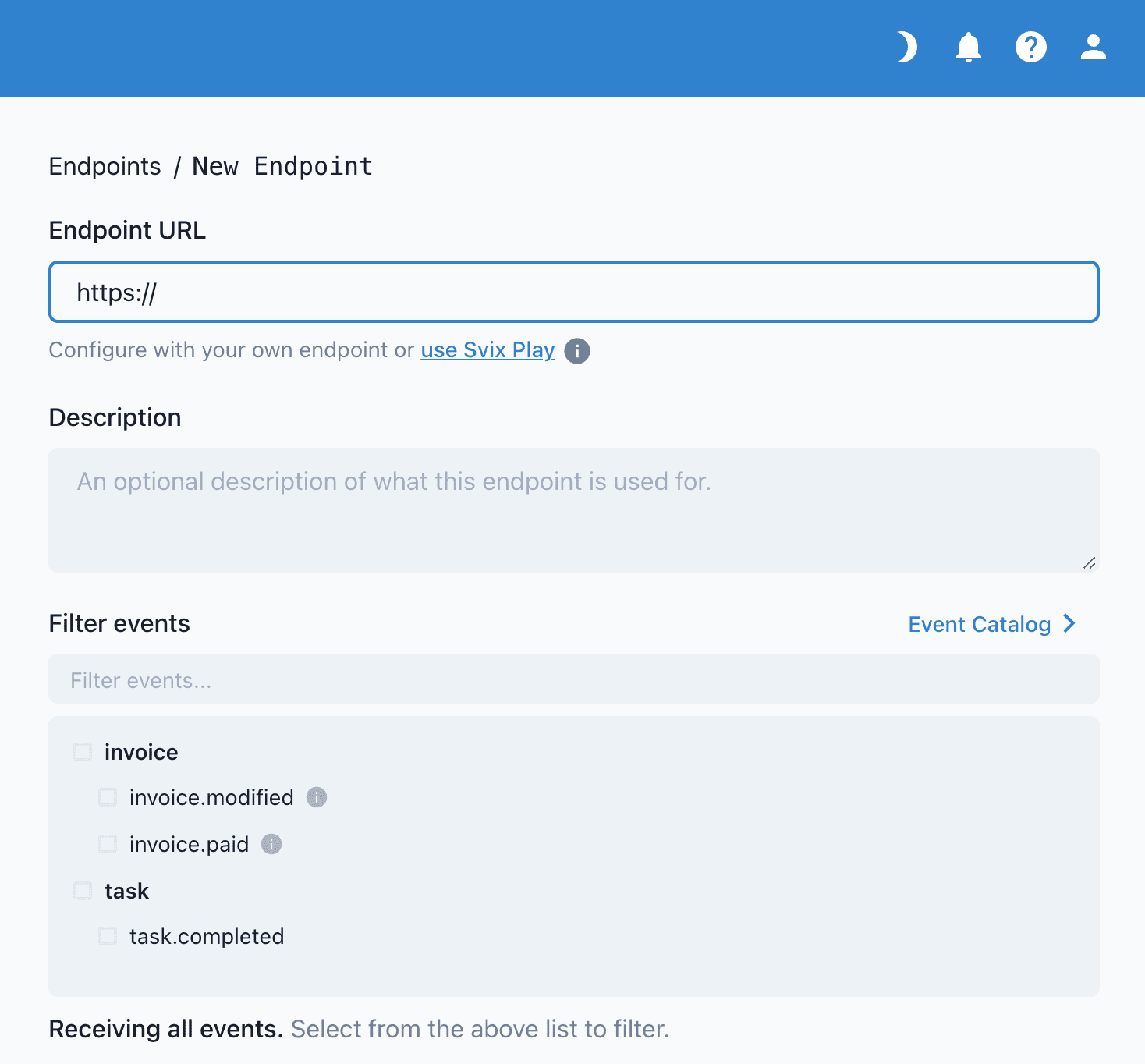
If you don't specify any event types, by default, your endpoint will receive all events, regardless of type. This can be helpful for getting started and for testing, but we recommend changing this to a subset later on to avoid receiving unexpected messages.
Testing your Endpoint
The easiest way to be more confident in your endpoint configuration is to start receiving events as quickly as possible.
That's why we have a "Testing" tab for you to send example events to your endpoint.
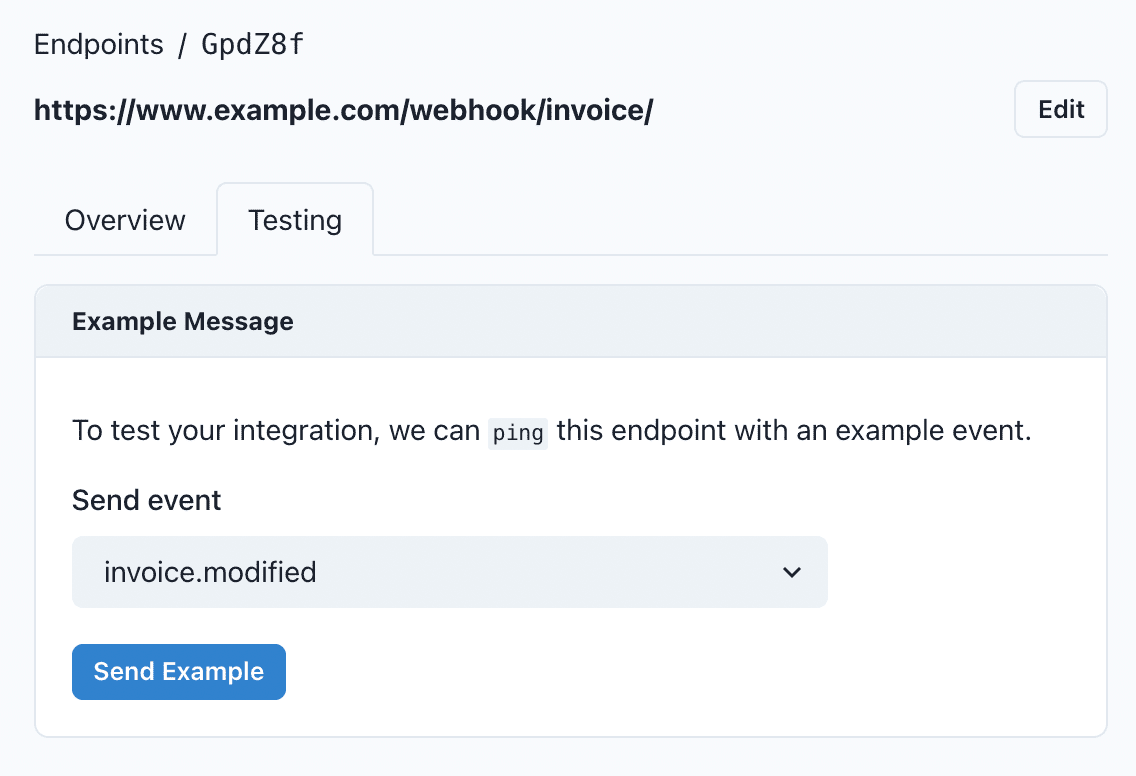
After sending an example event, you can click into the message to view the message payload, all of the message attempts, and whether it succeeded or failed.
Webhook Signature Verification
Webhook signatures is your way to verify that webhook messages are sent by us. For a more detailed explanation, check out this article on why you should verify webhooks.
How to verify webhooks with Svix Libraries
You can use a set of useful libraries by developed by our webhook partner Svix that make verifying webhooks very simple. Here is a an example using Javascript:
import { Webhook } from "svix";

const secret = "whsec_MfKQ9r8GKYqrTwjUPD8ILPZIo2LaLaSw";

// These were all sent from the server
const headers = {
"svix-id": "msg_p5jXN8AQM9LWM0D4loKWxJek",
"svix-timestamp": "1614265330",
"svix-signature": "v1,g0hM9SsE+OTPJTGt/tmIKtSyZlE3uFJELVlNIOLJ1OE=",
};
const payload = '{"test": 2432232314}';

const wh = new Webhook(secret);
// Throws on error, returns the verified content on success
const payload = wh.verify(payload, headers);
For more instructions and examples of how to verify signatures, check out their webhook verification documentation.
Dashboard
You can setup webhook, via the portal. To access the webportal, user name and password will be shared with you during onboarding. You can access the portal using this link dashboard.hive.scoutquest.in
Demo Dashboard Access
You can access a demo dashboard by visiting: dashboard.hive.scoutquest.in with username - sq-hive-demo and password - sq-hive-demo. This demo dashboard will let you explore the functionalities.
Retries
SQ Hive attempts to deliver each webhook message based on a retry schedule with exponential backoff.
The schedule
Each message is attempted based on the following schedule, where each period is started following the failure of the preceding attempt:
- Immediately
- 5 seconds
- 5 minutes
- 30 minutes
- 2 hours
- 5 hours
- 10 hours
- 10 hours (in addition to the previous)
If an endpoint is removed or disabled delivery attempts to the endpoint will be disabled as well.
For example, an attempt that fails three times before eventually succeeding will be delivered roughly 35 minutes and 5 seconds following the first attempt.
Manual retries
You can also use the application portal to manually retry each message at any time, or automatically retry ("Recover") all failed messages starting from a given date.
Troubleshooting Tips
There are some common reasons why your webhook endpoint is failing:
Not using the raw payload body
This is the most common issue. When generating the signed content, we use the raw string body of the message payload.
If you convert JSON payloads into strings using methods like stringify, different implementations may produce different string representations of the JSON object, which can lead to discrepancies when verifying the signature. It's crucial to verify the payload exactly as it was sent, byte-for-byte or string-for-string, to ensure accurate verification.
Missing the secret key
From time to time we see people simple using the wrong secret key. Remember that keys are unique to endpoints.
Sending the wrong response codes
When we receive a response with a 2xx status code, we interpret that as a successful delivery even if you indicate a failure in the response payload. Make sure to use the right response status codes so we know when message are supposed to succeed vs fail.
Responses timing out
We will consider any message that fails to send a response within {timeout duration} a failed message. If your endpoint is also processing complicated workflows, it may timeout and result in failed messages.
We suggest having your endpoint simply receive the message and add it to a queue to be processed asynchronously so you can respond promptly and avoiding getting timed out.
Failure Recovery
Re-enable a disabled endpoint
If all attempts to a specific endpoint fail for a period of 5 days, the endpoint will be disabled. To re-enable a disabled endpoint, go to the webhook dashboard, find the endpoint from the list and select "Enable Endpoint".
Recovering/Resending failed messages
Why Replay
- If your service has downtime
- If your endpoint was misconfigured
If you want to replay a single event, you can find the message from the UI and click the options menu next to any of the attempts.
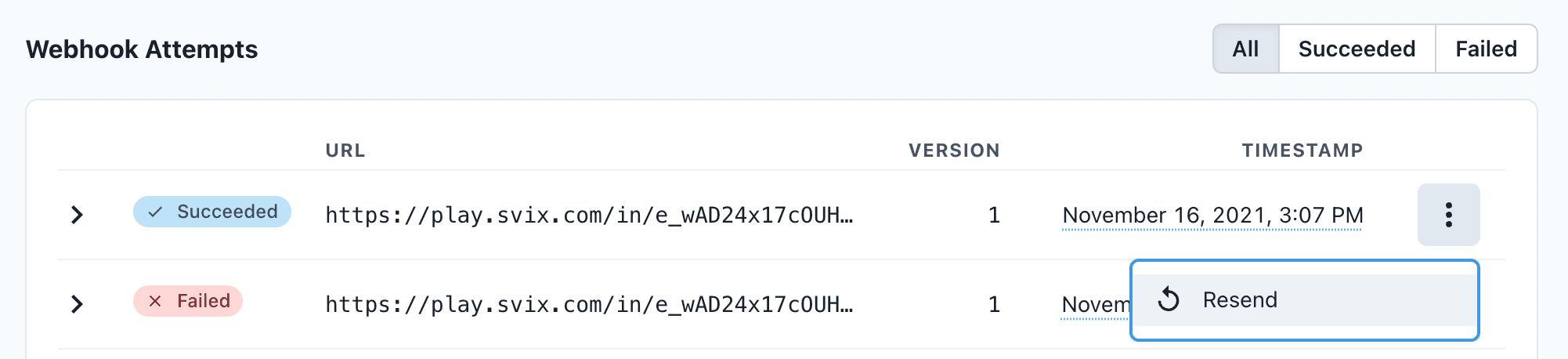
From there, click "resend" to have the same message send to your endpoint again.
If you need to recover from a service outage and want to replay all the events since a given time, you can do so from the Endpoint page. On an endpoint's details page, click Options > Recover Failed Messages.
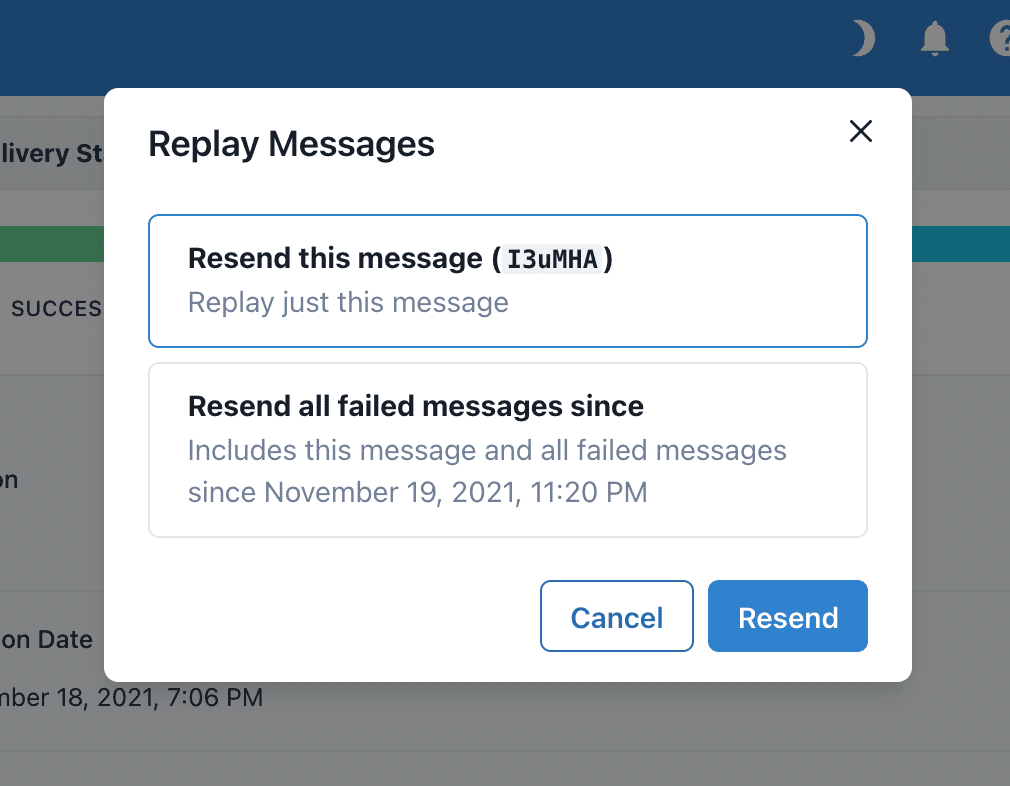
From there, you can choose a time window to recover from.
For a more granular recovery - for example, if you know the exact timestamp that you want to recover from - you can click the options menu on any message from the endpoint page. From there, you can click "Replay..." and choose to "Replay all failed messages since this time."
Examples for Instrument Update Messages Filter Categories
KEY_UPDATE - filterCategory:
Example for Filter Category - KEY_UPDATE
Example for Filter Category - KEY_UPDATE
{
  "id": "590882329969555364",
  "title": "Shriram Finance Limited",
  "description": "💎Block Deal in Shriram Finance Limited on 2024-06-18",
  "content": "➖ Seller(s):\nBNP PARIBAS FINANCIAL MARKETS\nTotal Sold Qty:1,467,822\nTotal Sold Value:401.03 crores\n➕ Buyer(s):\nMARSHALL WACE INVESTMENT STRATEGIES - EUREKA FUND\nTotal Bought Qty:1,467,822\nTotal Bought Value:401.03 crores\n",
  "scripDetails": {
    "bseScripCode": "511218",
    "scripName": "Shriram Finance Limited",
    "bseTickr": "SHRIRAMFIN",
    "nseTickr": "SHRIRAMFIN",
    "isin": "INE721A01013"
  },
  "linkDetail": {
    "shortLink": "https://sqst.in/PCxmR"
  },
  "creationTime": 1718714125,
  "filterCategory": "KEY_UPDATE"
}
ANALYTICAL_UPDATE - filterCategory:
Example for Filter Category - ANALYTICAL_UPDATE
Example for Filter Category : ANALYTICAL_UPDATE
{
  "id": "589832824574705351",
  "title": "Zomato Ltd.",
  "description": "SBI Securities has published a  Buy report on Zomato Ltd.. (CMP: 186.20 As on 14 Jun 24 | 16:00 )",
  "content": "🤖 AI interpretation: Zomato Ltd. is recommended as a `BUY` with a 12-month target price of 214.0/-. The basis for this recommendation includes its diversified business model, strong brand, expanding product offerings, presence in 800+ cities, strong financial performance, and plans to double the store count. The stock's current valuation is considered premium but well supported by earnings growth. Key risk factors include any consumption slowdown and high competition.",
  "scripDetails": {
    "bseScripCode": "543320",
    "scripName": "Zomato Ltd.",
    "bseTickr": "ZOMATO",
    "nseTickr": "",
    "isin": "INE758T01015"
  },
  "linkDetail": {
    "shortLink": "https://sqst.in/hyONA"
  },
  "creationTime": 1718463903,
  "filterCategory": "ANALYTICAL_UPDATE"
}
MEDIA_COVERAGE - filterCategory:
Example for Filter Category - MEDIA_COVERAGE
Example for Filter Category - MEDIA_COVERAGE
 {
  "id": "590874291145537518",
  "title": "M&M",
  "description": "Video feed - CNBC TV18 Newsmakers | M&M: Best Performing Nifty Stock 2002-2024 | Mega Exclusive | N18V",
  "content": "CNBC TV18 Newsmakers | M&M: Best Performing Nifty Stock 2002-2024 | Mega Exclusive | N18V",
  "scripDetails": {
    "bseScripCode": "509196",
    "scripName": "M&M",
    "bseTickr": "MMRUBBR-B",
    "nseTickr": null,
    "isin": "INE159E01026"
  },
  "linkDetail": {
    "shortLink": "https://sqst.in/d1d04"
  },
  "creationTime": 1718712208,
  "filterCategory": "MEDIA_COVERAGE"
}
SPVMA - filterCategory
Example for Filter Category : SPVMA
 {
  "id": "590834457848837239",
  "title": "Kalpataru Projects International Limited",
  "description": "🔥 Unusually high trading activity - Trading volume as of 02:54PM is  9.99 times of the average daily volume (2 week avg.) \n34 Lakh shares (Value: Rs. 413 Crores)  traded on NSE as of 02:54PM.",
  "content": "🏷️ CMP @ 02:54PM: 1173.7 (Chg %: -3.81)",
  "scripDetails": {
    "bseScripCode": "522287",
    "scripName": "Kalpataru Projects International Limited",
    "bseTickr": "KPIL",
    "nseTickr": "KPIL",
    "isin": "INE220B01022"
  },
  "linkDetail": {
    "shortLink": "https://sqst.in/CaKY8"
  },
  "creationTime": 1718702711,
  "filterCategory": "SPVMA"
}
EVENT_SCHEDULE - filterCategory:
Example for Filter Category - EVENT_SCHEDULE
Example for Filter Category - EVENT_SCHEDULE
{
  "id": "590874081665218776",
  "title": "KIRLOSKAR OIL ENGINES LTD.",
  "description": "💼 Analyst / Institutional Meet",
  "content": "Kirloskar Oil Engines Limited held a virtual meeting with Antique securities to discuss the operational overview of the company. No unpublished price sensitive information was disclosed. The meeting was in compliance with SEBI regulations.",
  "scripDetails": {
    "bseScripCode": "533293",
    "scripName": "KIRLOSKAR OIL ENGINES LTD.",
    "bseTickr": "KIRLOSENG",
    "nseTickr": null,
    "isin": "INE146L01010"
  },
  "linkDetail": {
    "shortLink": "https://sqst.in/GixAV"
  },
  "creationTime": 1718712158,
  "filterCategory": "EVENT_SCHEDULE"
}
TECHNICAL_IDEA - filterCategory
Example for Filter Category - TECHNICAL_IDEA
Example for Filter Category : TECHNICAL_IDEA
 {
  "id": "583227559222362559",
  "title": "COROMANDEL",
  "description": "Long",
  "content": "#COROMANDEL #NSE - CUP PATTERN",
  "scripDetails": {
    "bseScripCode": "506395",
    "scripName": "COROMANDEL",
    "bseTickr": "COROMANDEL",
    "nseTickr": null,
    "isin": "INE169A01031"
  },
  "linkDetail": {
    "shortLink": "https://sqst.in/qZcls"
  },
  "creationTime": 1716889085,
  "filterCategory": "TECHNICAL_IDEA"
}
UNCLASSIFIED - filterCategory
Example for Filter Category - UNCLASSIFIED
Example for Filter Category : UNCLASSIFIED
 {
  "id": "589113559821504865",
  "title": "Amber Enterprises India Ltd",
  "description": "Restructuring",
  "content": "Intimation on pronouncement of the order dated 11 June 2024 (uploaded on website of Hon''ble NCLT on 13 June 2024) under first motion application bearing Company Application No. (CAA)67(MB)2024 ....",
  "scripDetails": {
    "bseScripCode": "540902",
    "scripName": "Amber Enterprises India Ltd",
    "bseTickr": "AMBER",
    "nseTickr": null,
    "isin": "INE371P01015"
  },
  "linkDetail": {
    "shortLink": "https://sqst.in/SIKoq"
  },
  "creationTime": 1718292417,
  "filterCategory": "UNCLASSIFIED"
}